


Tandem: Language exchange
4.15.41K Reviews
App Specs
- Version
- 6.34.0
- Updated On
- License
- Free
- Downloads
- 10,000,000+
- Developer
- Tripod Technology GmbH
- Categories
- Education
- Platform
- Android, iOS
Screenshots
 Analysis by AppCompare
I approach Tandem: Language exchange as a place to turn language study into real conversations, rather than another course built around exercises. That difference is its main appeal: you meet people who speak the language you want to practise and can learn through the back-and-forth of everyday communication. It’s an Education app from Tripod Technology GmbH, and its scale is reassuring for a newcomer: more than 10 million installs, a 4.1 average from around 403,000 ratings, and roughly 5,300 written reviews.
That scale doesn’t mean every conversation will be a perfect lesson. Tandem depends on people having time, patience, and compatible goals, so the value you get comes partly from how you approach it. I’d recommend it to learners who are ready to write or speak with other people, but I wouldn’t treat it as a complete replacement for a structured course, a grammar reference, or a teacher when you need systematic explanations.
Getting Started: A Friendly Introduction
The moment you download Tandem, you’re greeted with a warm interface that makes you feel right at home. Signing up is a breeze. You can either use your email or social media accounts, which is always a plus in my book. Once you're in, you can set your language preferences. You’ll be asked about the languages you speak and the ones you’re eager to learn. It’s a simple yet effective way to match you with the ideal language buddy.
Set a goal before you start browsing
For a first-time user, the most useful preparation happens before sending a message. Decide what you want to practise in a real exchange: casual conversation, work-related vocabulary, travel situations, or confidence speaking aloud. A specific goal makes it easier to start naturally and helps you judge whether a conversation is useful. “I’m learning Spanish” gives a partner little to respond to; “Could we practise ordering food and asking follow-up questions?” gives the chat a direction without turning it into homework.
It also helps to be realistic about your current level. If you’re a beginner, say so plainly and ask for simple wording or short corrections. If you’re more advanced, bring a topic where you can explain an opinion rather than only trade greetings. This small bit of preparation reduces the awkwardness of a first message and keeps the other person from having to guess what kind of help you want.
Finding Your Language Buddy
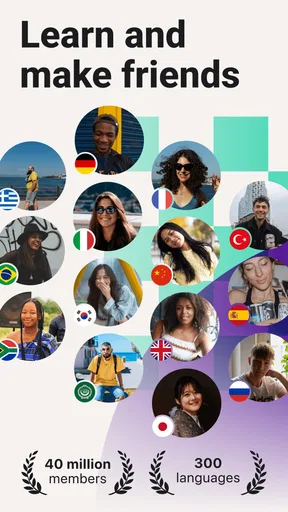
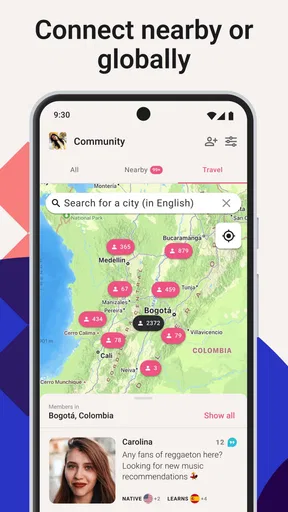
Here's where the magic happens. The app uses your preferences to connect you with native speakers from around the world. It’s like a social network but with a purpose. I remember my first chat with a native Spanish speaker from Argentina. It felt so authentic and engaging, like a mini cultural exchange right at my fingertips. The app’s algorithm does an impressive job at recommending partners based on your interests and language goals. You can even filter search results by age, location, and learning topics, which is incredibly handy.
Matching is only the beginning; a suggested profile isn’t a promise that two people will communicate in the same way. I’d look for signs of a workable exchange: overlapping interests, a clear reason to learn each other’s languages, and a tone that feels comfortable. Instead of sending a generic greeting to many people, I prefer a short note that refers to a shared topic and proposes one easy starting point. That makes it simpler for the other person to reply and gives both of you a way to see whether the conversation flows.
Worth Reading Before You Choose

EA SPORTS FC Mobile 26 Is a Bigger Football Game, but It Takes Time

Flipboard Shows What News Apps Must Do Beyond the Feed

Switching to Android Auto Means Rethinking Your Driving Routine

Google Calendar Makes a Crowded Week Easier to Manage

Ludo King Makes the Most of the Minutes Between Plans

Baby Panda World Brings Quick Play to Modern Phones, but Its Game Library Feels Busy
A useful trade-off is that an open community can offer more variety than a fixed lesson schedule, but you have to do more of the organising. Some partners may reply slowly, while others may be looking for a different kind of practice. I wouldn’t take a quiet chat personally or spend a long time trying to rescue a mismatch. Moving on politely is part of finding a partner whose pace and learning needs suit yours.
Make the first exchange easy to sustain
One practical way to avoid a lopsided exchange is to make the two languages part of the plan from the start. For instance, you could suggest spending a portion of the conversation in your target language and another portion helping your partner with yours. You don’t need a rigid timer; even agreeing to take turns by topic can make the exchange feel fair. If one person keeps correcting but never gives the other room to practise, the arrangement may stop feeling mutual.
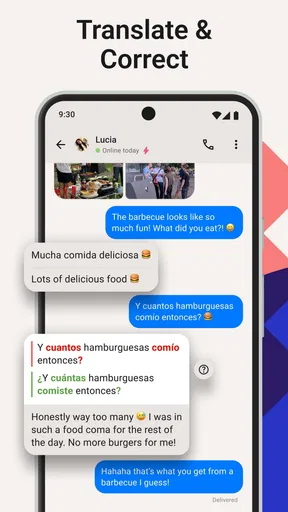
I’d also treat corrections as information to review later, not as a reason to interrupt every sentence. When a partner points out a better phrase, note the original wording and the more natural alternative, then try to use that alternative in your next reply. This turns a quick chat correction into something you can actually remember. It’s a more focused workflow than collecting lots of feedback without revisiting any of it.
Chat Features That Make a Difference
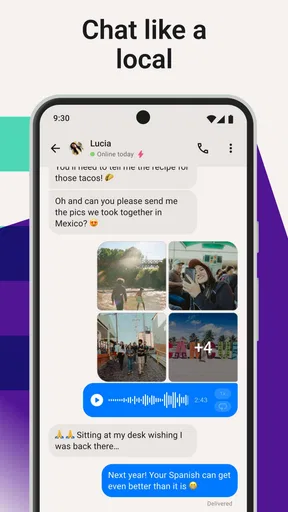
Tandem isn’t just about text chats. Oh no! It offers voice and video calls too, which was a game-changer for me. Practicing pronunciation in real-time is invaluable. The app also provides a handy correction tool. You can correct your partner’s messages or get feedback on your own, creating a supportive learning environment. I found the voice note feature particularly useful for practicing accents and intonations. It’s like having a mini language lab in your pocket.
For many learners, moving from text to audio is the point where the app becomes more demanding—and more useful. Text gives you time to form a sentence, while a voice message asks you to produce language without polishing every word. I’d use text first to establish a comfortable rhythm, then try a short voice note on a familiar subject. A brief recording about your day is easier to respond to than a long, carefully prepared monologue, and it gives you a chance to hear which sounds or phrases you want to work on.
Live calls are not automatically the right next step for everyone. If you get nervous speaking with a stranger, there’s no need to rush into a call just because the option exists. You can build confidence through written exchanges and voice notes before trying a real-time conversation. Conversely, if your main goal is to practise reacting at natural speed, staying in text alone may keep you in your comfort zone. I’d choose the format according to the skill I want to practise that day, rather than assuming that one type of chat is always better.
Learning with a Community
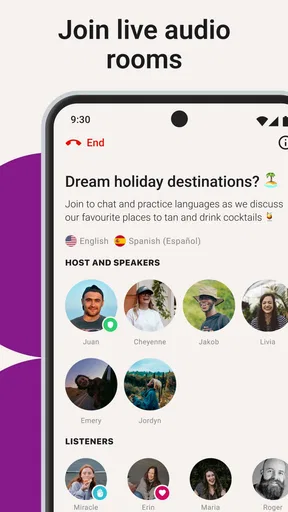
One of the standout features of Tandem is its vibrant community. You can join group discussions or participate in language exchange events. These are fantastic for diving deeper into cultural nuances and making new friends along the way. I once joined a group chat about Spanish idioms, and it was enlightening to see how language reflects culture. You’re not just learning words; you’re learning a way of life.
Group spaces can be a useful alternative when you don’t yet have a regular partner, or when you want to observe how several speakers express the same idea. I’d use them to collect questions and notice conversational patterns, then bring one interesting phrase into a one-to-one exchange to ask how it would sound in a different situation. The trade-off is that a group discussion may move quickly and may not provide the focused feedback you’d get from a dedicated partner, so it’s better as a complement than as your only practice method.
Safety and Comfort
I know what you’re thinking: "Is it safe to chat with strangers online?" Tandem has got your back. The app has strict community guidelines and a team that reviews profiles and content to ensure a safe environment. Plus, you can choose who you want to chat with and block or report users if needed. It’s reassuring to know that the app prioritizes user safety and comfort.
I still recommend using ordinary care in any conversation with someone you’ve just met online. Keep the exchange focused on language learning until you feel comfortable, and don’t share personal details simply because a chat is friendly. You can end a conversation that feels pushy or unrelated to your learning goals, and blocking or reporting is there if someone crosses a line. A welcoming community is helpful, but your own boundaries matter just as much.
A realistic routine for your first week
Imagine you’re learning Spanish and have a few spare moments after dinner. You open the app with a simple aim: practise describing what you did that day. You find a partner whose interests overlap with yours, send a personal but brief introduction, and ask whether they’d like to exchange a few messages in Spanish and English. If the conversation feels comfortable, you try a voice note the next time. Later, you look back at one correction and reuse the improved phrase. That’s a modest session, but it connects a real-life topic with writing, listening, and speaking practice.
The important part is not to turn every exchange into a performance. You don’t need a perfect accent or a long list of questions to make progress. A recurring, manageable conversation can be more valuable than an ambitious plan that makes you avoid opening the app. If you’re busy, a short written exchange can keep the habit alive; when you have more time, a call or a deeper topic can stretch you further.
Where Tandem fits among language-learning options
Compared with a self-guided course, Tandem gives you less control over lesson order and more exposure to how people actually communicate. A course is often the better choice when you want a clear syllabus, predictable practice, and explanations that build step by step. A tutor is a stronger fit when you need expert correction, exam preparation, or a conversation that stays focused on your needs. Tandem’s advantage is the human exchange: you can ask how someone would phrase something in a real context and respond to ideas rather than selecting an answer from a set of exercises.
That makes it a particularly good companion to structured study. I might learn a grammar point elsewhere, then use a Tandem conversation to see whether I can apply it naturally. I would skip it, at least as my main learning tool, if I’m not comfortable contacting people, don’t want to help someone in return, or need guaranteed instruction at a particular time. It’s also not the best fit for a learner who wants progress to be measured through a fixed sequence of lessons; the experience depends on conversations and the effort both people put in.
Common first-week questions, answered in context
Do you need to be fluent before joining? No: a beginner can start with simple exchanges, provided they explain their level and keep the first goal manageable. Is it only for people who want to speak? No: written conversation can be a practical starting point, though learners focused on pronunciation will eventually benefit from trying audio. Do you have to use calls? No; they’re an option, not a requirement. Can you rely on Tandem as your only study method? I wouldn’t. It works best when conversation practice supports, rather than replaces, the vocabulary and grammar work you need to do on your own.
Another question is whether you should pay before you know if the app suits you. Tandem is free to use, with in-app purchases ranging from $1.49 to $180.00 per item. I’d start with the free experience and first see whether you enjoy making connections and keeping an exchange going. Paid options are worth considering only if a specific extra would solve a problem you’ve actually encountered; they won’t create a good language partnership by themselves. The app is rated Teen, so it’s also sensible for families to consider whether a social language-exchange setting is appropriate for the young person using it.
The Price Tag: Free vs. Premium
Now, let’s talk about the cost. The basic version of Tandem is free, which is perfect for casual learners. However, if you’re like me and want to dive deeper, the premium version offers some tempting features. You get unlimited translations and the ability to find partners in specific countries. It’s a small price to pay for a more tailored learning experience. Trust me, it’s worth every penny if you’re serious about mastering a new language.
I’d be more cautious about treating a paid tier as a shortcut to better learning. First work out what is slowing you down: difficulty finding suitable people, uncertainty about what to say, or trouble remembering feedback. Only the first of those is necessarily a discovery problem; the others may respond better to a clearer conversation plan or a regular review habit. This is one reason I’d try the free version before deciding whether a purchase is useful for my own routine.
Final Thoughts: A Must-Have for Language Enthusiasts
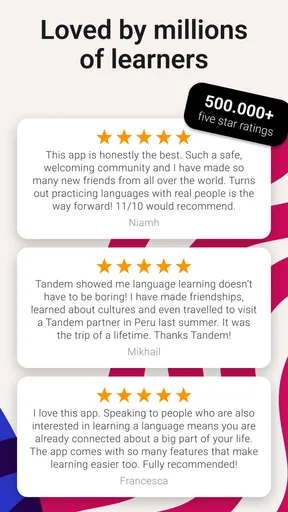
To wrap it up, Tandem: Language exchange is more than just an app; it’s a community. Whether you’re a beginner or looking to polish your skills, this app offers a dynamic and interactive way to learn. The real-life conversations and cultural exchanges are what make it stand out. So, if you’re ready to take your language skills to the next level, give Tandem a whirl. It might just be the language partner you’ve been waiting for.
Tandem is free, runs on devices with Android 8.0 or later, and its current version is 6.15.0. Tripod Technology GmbH has kept the app focused on language exchange since its release on September 13, 2016. I see it as a good choice when I want practice that feels social and grounded in real communication, rather than another set of isolated drills. Its 4.1 average across hundreds of thousands of ratings suggests many people find value in that approach, though the match quality and consistency will naturally vary from one conversation to another.
Ready to dive into a world of languages? Download Tandem today and start your journey. Happy learning!
Pros
- User-friendly interface
- easy to navigate.
- Wide variety of languages available.
- Connects with native speakers worldwide.
- Includes text
- audio
- and video chat options.
- Free version offers substantial features.
Cons
- Occasional connectivity issues reported.
- In-app purchases can be pricey.
- Some users experience spam messages.
- Limited free translations per day.
- Profile verification process can be slow.
FAQs for Tandem: Language exchange
What is Tandem: Language Exchange and how does it work?
Tandem is a language exchange app designed to connect users from around the world to practice languages with native speakers. After creating a profile, users can search for partners who are fluent in the language they wish to learn. The app offers text, voice, and video chat options, allowing for a comprehensive language learning experience.
Is Tandem free to use, or are there any subscription fees?
Tandem offers a free version with essential features for language exchange. However, for enhanced features such as unlimited translations, access to professional tutors, and the ability to find partners faster, users can subscribe to Tandem Pro. The subscription is optional and offers a more tailored experience.
What languages are available for practice on Tandem?
Tandem supports over 160 languages, making it a versatile platform for learners. Users can find partners for popular languages like Spanish, French, Chinese, and lesser-known ones such as Swahili or Basque. The app’s wide range ensures that almost any language learner can find a suitable exchange partner.
How does Tandem ensure the safety and privacy of its users?
Tandem prioritizes user safety by implementing a verification process for profiles and allowing users to report any inappropriate behavior. The app also has privacy settings that enable users to control who can contact them and what information is visible on their profile, ensuring a secure environment for language practice.
Can I use Tandem to connect with professional language tutors?
Yes, Tandem offers a feature called Tandem Tutors, where users can connect with certified language tutors for personalized lessons. This is an excellent option for those who want structured learning alongside casual language exchange. Tutor sessions are available for a fee, separate from the Tandem Pro subscription.


